Agent
Inkmoss AgentInkmoss Agent
围绕论文项目读取文档、资料和上下文,调用学术技能与工具完成可追踪任务。
Work across papers, sources, and project context with academic skills, tools, and traceable tasks.
Inkmoss 是本地优先学术写作工作台:用 Inkmoss、LaTeX、Typst 或 Markdown 写作,在 MossView 与 Full PDF 中检查结果,并通过 Agent、AI 协作区、Zotero、MossShare 和高保真 DOCX 完成研究交付。
Inkmoss is a local-first academic writing workbench for Inkmoss, LaTeX, Typst, and Markdown, with MossView, Full PDF, Inkmoss Agent, reviewable AI collaboration, Zotero, MossShare, and high-fidelity DOCX delivery.
3.0.2 提供 macOS arm64 DMG 与 Windows x64 EXE。安装后在设置页复制“本机机器码”,提交试用申请,我们会把绑定这台机器的激活码发到你的邮箱。
Version 3.0.2 is available as a macOS arm64 DMG and Windows x64 EXE. After installation, copy the machine code from Settings and request a machine-bound trial code.
原生 PDF、语言岛互通、Word 交付与应用内更新。
Native PDF, connected language islands, Word delivery, and in-app updates.
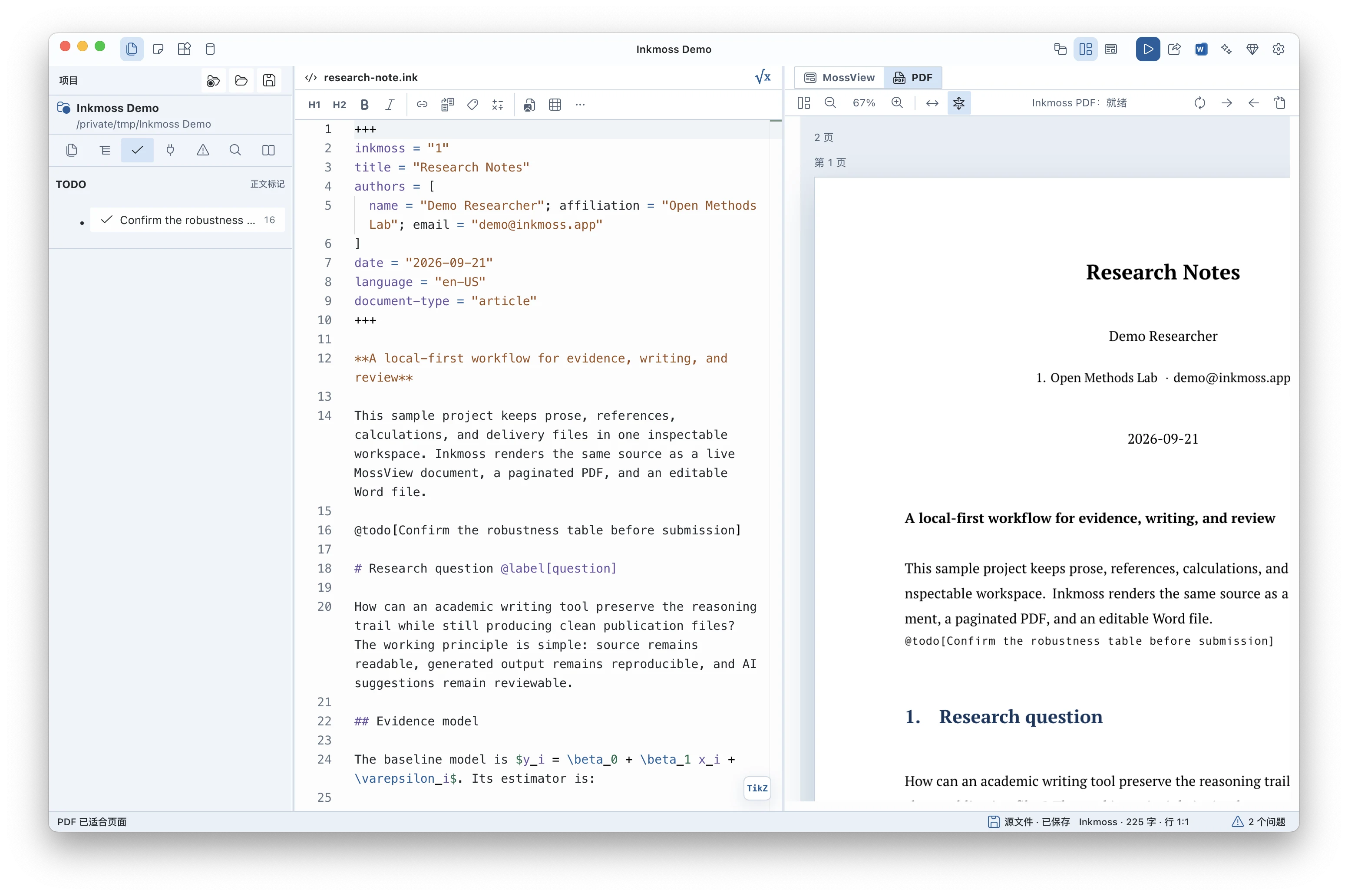
Inkmoss 文档默认由原生分页器生成 Full PDF。文档中的完整 LaTeX 与 Typst 语言岛继续使用各自的编译工具链,再作为独立资源进入原生页面;引用、连续编号、页码与参考文献在整篇文档中互通。
Inkmoss documents use the native paginator for Full PDF by default. Full LaTeX and Typst language islands keep their own compilation toolchains and enter native pages as separate resources, sharing references, continuous numbering, page numbers, and bibliography across the document.
.ink 是可编辑的 Inkmoss 源文档;.inkmoss 是用于研究交换、归档与重放的压缩集合。它们与 LaTeX、Typst、Markdown 组成四种并列的文档语言。
.ink is editable Inkmoss source; .inkmoss is a compressed collection for research exchange, archiving, and replay. Inkmoss, LaTeX, Typst, and Markdown are the four peer document languages.
.ink 文档默认原生分页,修复单段定理正文、浮动图分页、孤标题与双向源码定位;PDF.js 负责阅读、搜索和缩略图。Supported .ink documents use native pagination by default. This release fixes single-paragraph theorem bodies, floating figures, orphan headings, and navigation between source and PDF. PDF.js handles reading, search, and thumbnails.论文项目通常混杂源码、参考文献、图表、模板、编译日志、PDF、DOCX 交付和导师反馈。Inkmoss 从这种真实混乱开始设计。
Inkmoss starts with the real mess of a paper project: source files, bibliography, figures, templates, compile logs, PDFs, DOCX handoff, and feedback loops.
围绕论文项目读取文档、资料和上下文,调用学术技能与工具完成可追踪任务。
Work across papers, sources, and project context with academic skills, tools, and traceable tasks.
在编辑器右侧自然展开,读取当前选区与问题;真正写入前,以差异和快照确认。
Extend the editor with current selection and issue context, then review diffs and snapshots before writing.
把论点、证据和材料整理成可回到正文使用的卡片,而不是孤立笔记。
Organize claims, evidence, and source material into cards that remain connected to the manuscript.
向不看源码的读者发送 PDF 审阅链接,也可分享源码模式;反馈拉回后定位到源文。
Share PDF proof with non-technical reviewers or source review with collaborators, then map returned feedback to source.
安装面向阅读、写作和研究的技能,并让 AI 协作区与 Agent 使用同一套能力。
Install reading, writing, and research skills shared by the AI collaboration rail and Inkmoss Agent.
输出标题、OMML 公式、表格、图片、脚注、引用与参考文献,并在交付前检查结构风险。
Export headings, OMML math, tables, figures, notes, citations, and references with structural checks before handoff.
连接 Zotero 与项目 `.bib` 文献库,搜索文献并按当前文档语言插入正确引用语法。
Connect Zotero and project `.bib` libraries, search references, and insert syntax for the active document language.
用 Git 或 WebDAV 连接项目存储,查看连接状态,同时保留本地优先的文件工作流。
Connect project storage through Git or WebDAV while keeping the file workflow local-first.
直接打开并运行独立 `.py`、`.R`、`.do` 文件;缺少依赖时可在项目终端按提示安装。
Open and run standalone `.py`, `.R`, and `.do` files, with project-terminal guidance when dependencies are missing.
本地优先并不意味着孤立。协作模型保持异步、安静、可检查。
Local-first does not mean isolated. The collaboration model stays asynchronous, calm, and reviewable.
识别根文件、参考文献模式、编译器、模板和项目元数据。
Detect root files, bibliography mode, compiler settings, templates, and project metadata.
源码编辑、PDF 预览、日志和问题列表保持靠近文本。
Edit source while PDF preview, logs, issues, and source/PDF navigation stay close to the text.
AI 读取选中文本、编译日志、资料库片段和最近差异,返回解释或补丁。
AI can read selected text, compile logs, vault slices, and recent diffs, then return explanations or patches.
接受或拒绝差异,导出 DOCX,生成风险报告或打包协作审阅。
Accept or reject diffs, export DOCX, generate risk reports, or package changes for asynchronous review.
从 Inkmoss 设置页复制“本机机器码”,提交后我们会人工审核,并把绑定这台机器的试用码发到你的邮箱。
Copy the machine code from Inkmoss Settings, then submit this form. We will email a machine-bound trial code after review.